Lifesize activation — provisioning configuration file
Here are the steps for getting the information from the provisioning configuration file.
Provisioning configuration file
From the provisioning configuration file you need the device.prov.serverName parameter, for example:
device.prov.serverName="prov.vp.vc/prov/trio/v1/activate/default/b12b12bb-b123-1234-5b67-123b45bb67b8/"
Completing the configuration
-
Configure the LDAP directory ().
-
Configure the following settings:
Hostname Set this to api.moon.vp.vc Username Set this to uuid Password Set this to the last alphanumeric section of the device.prov.serverName field from the provisioning configuration file.
In our example data this is b12b12bb-b123-1234-5b67-123b45bb67b8
Base Set this to ou=tags,dc=pexip Port Set this to 389 Encryption Select None. 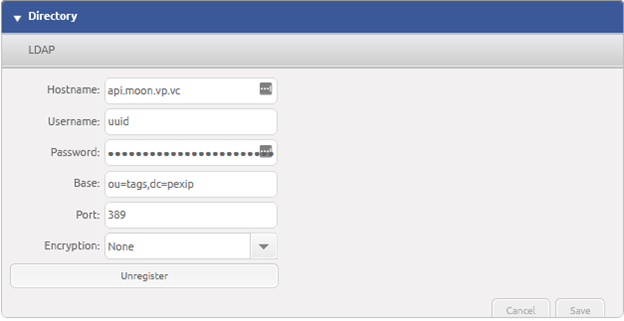
- Select to save the Directory settings.
-